What is Vantage?
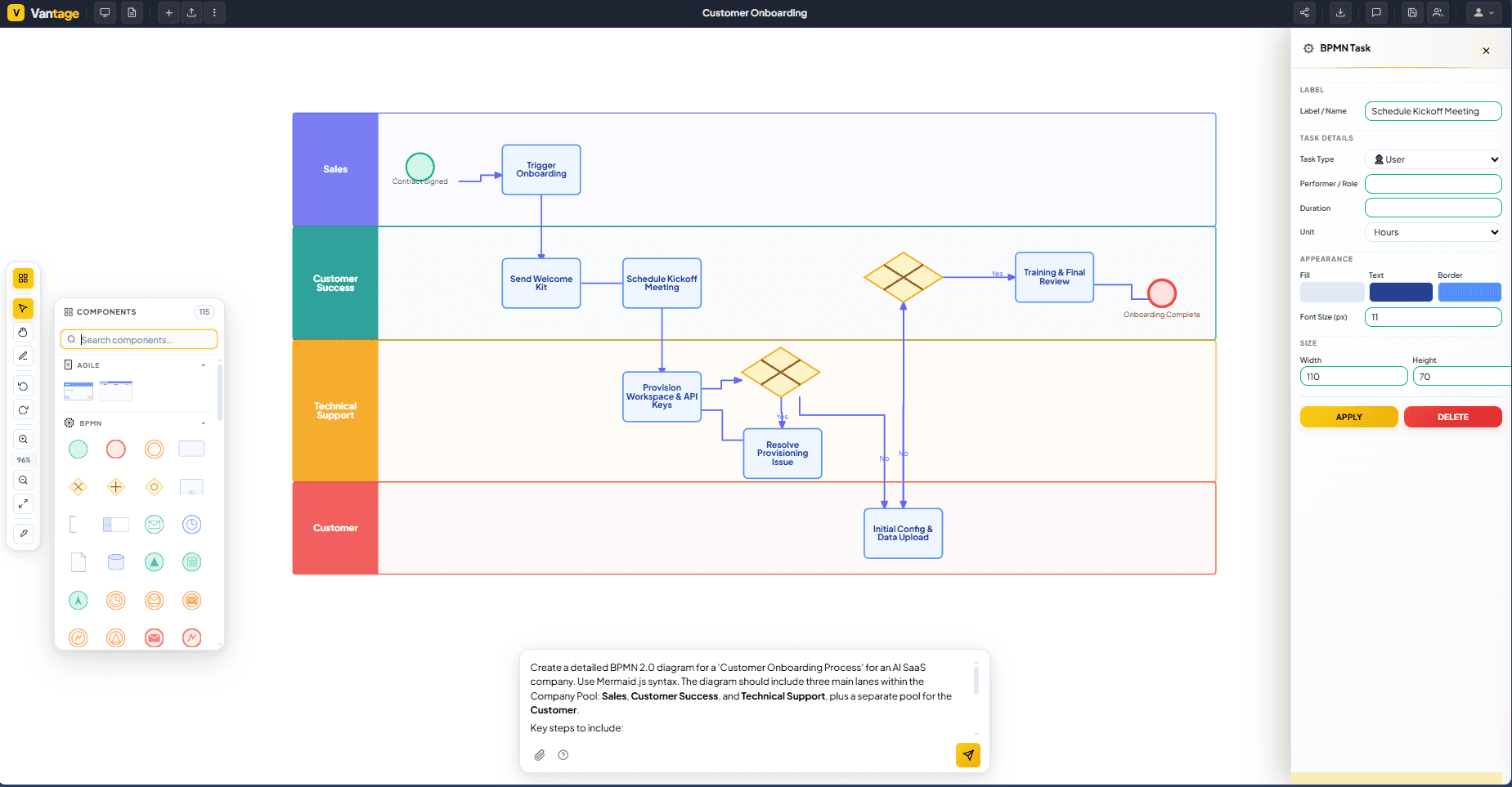
Vantage is an AI process diagram generator that converts plain-language workflow descriptions into professional BPMN, VSM, Flowchart, Org Chart, and OKR diagrams in under 10 seconds, for consultants, operations teams, and lean and agile coaches. Developed by Hogoflow, it eliminates the manual shape-by-shape drawing required by tools like Visio by accepting free-text input in any language and producing a fully structured, interactive canvas automatically. The AI picks the appropriate diagram type, lays out all nodes, and renders the result in one pass — users then refine the output through conversational chat commands rather than drag-and-drop redrawing. Vantage also includes an AI Ask Insight feature that lets users select any part of a diagram and ask it to spot bottlenecks, estimate cost of delay, or suggest improvements on demand. A library of 150+ industry-specific templates covers BPMN for insurance, banking, and healthcare; VSM for manufacturing; and flowcharts for standard operating procedures. Finished diagrams export as print-ready PDFs. All data transits through encrypted channels, is never used for AI model training, and is not retained after processing, making it suitable for sensitive client work. For teams needing the best AI process diagram tool that handles multiple notation standards without specialist software, Vantage offers a browser-based, no-install option that works across languages and industries.
What is Vantage used for?
Vantage is primarily used for rapid creation of process diagrams — BPMN, VSM, flowcharts, org charts, and OKR maps — from natural-language descriptions. It serves consultants, operations managers, and lean or agile practitioners who need polished, stakeholder-ready diagrams without specialist diagramming software.
How much does Vantage cost?
Pros and cons
Pros
- Generates BPMN, VSM, Flowchart, Org Chart, and OKR diagrams from a single plain-text description in under 10 seconds
- 150+ industry-specific templates covering insurance, banking, healthcare, manufacturing, and SOP flowcharts
- Conversational refinement — add steps, rename nodes, or recolour swim lanes by typing a chat command rather than redrawing
- AI Ask Insight analyses selected diagram sections to spot bottlenecks, estimate cost of delay, or explain flows to stakeholders
- Supports input in any language with no translation step required
Cons
- Export limited to PDF; no mention of native Visio, Lucidchart, or vector format export on the homepage
- No published information on API access or integration with third-party tools such as Confluence or Notion
- Pricing tiers and feature limits are not detailed on the main landing page
Questions about Vantage
What is Vantage used for?
Vantage is used to generate professional process diagrams — including BPMN, VSM, Flowcharts, Org Charts, and OKR maps — from plain-language descriptions. It targets consultants who need client-ready deliverables quickly, operations teams documenting SOPs and approval chains, and lean or agile coaches producing current-state and future-state process maps during workshops.
Is Vantage free to use?
Vantage advertises a free starting tier with no credit card required and no software installation. The homepage states 'Free to start', though specific usage limits and paid plan pricing are not listed publicly — users should check the Vantage pricing page for current plan details.
What diagram types does Vantage support?
Vantage supports five diagram types: BPMN (Business Process Model and Notation), VSM (Value Stream Mapping), Flowcharts, Org Charts, and OKR diagrams. The AI automatically selects the most appropriate type based on the workflow description provided, or users can direct it explicitly.
How does Vantage compare to Visio or Lucidchart?
Unlike Visio or Lucidchart, which require users to manually place and connect shapes, Vantage generates a complete structured diagram from a text description in under 10 seconds. It is browser-based with no installation needed, supports multiple notation standards, and includes conversational editing — making it faster for first-draft diagrams, though it currently lacks the deep integration and format-export options of established diagramming suites.
Does Vantage use my data to train AI models?
No. According to Hogoflow's published privacy stance, prompts and diagram content are never used for AI training. All data passes through end-to-end encrypted channels and is not retained after processing, and each workspace is fully private and isolated from other accounts.
What are the best alternatives to Vantage?
Reviews
Sign in to rate and review Vantage.
Sign in to reviewNo reviews yet. Be the first to review Vantage!